
UGC Creator Onboarding: How to Set Up Your UGC.Store Profile for Maximum Visibility

You have chosen your niche. You have filmed your mock videos. You have your UGC starter kit ready. Now comes the moment that separates hobbyists from professionals: creating a profile that makes brands stop scrolling and start booking.
Your UGC.Store profile is not a formality. It is your storefront, your resume, your portfolio, and your sales pitch rolled into one. A fully optimized profile can generate 10x more views, 5x more inquiries, and 3x more paid gigs than a half-finished page. And the best part? It takes less than 30 minutes to set up correctly.
This guide walks you through every field, every toggle, and every decision that turns your UGC.Store profile into a client magnet. Follow it step by step, and by the end of today, brands will be able to find you, trust you, and hire you — without you sending a single cold pitch.
“I created my UGC.Store profile in 20 minutes and thought I was done. Two weeks later, I had zero views. Then I went back and optimized every field — better headshot, niche keywords, five portfolio videos, clear rates. My profile views jumped from 10 per week to over 200. I landed my first $400 retainer within 10 days of making those changes.”
— Nina K., UGC Creator (SaaS & Productivity), 16 months in the industry
Why Your UGC.Store Profile Is Your Most Valuable Asset

Most UGC creators treat platform profiles like afterthoughts. They upload a blurry selfie, write two generic sentences, add one video, and wonder why no brands reach out. Meanwhile, the creators who treat their profiles like landing pages — with intentional design, clear messaging, and social proof — get discovered while they sleep.
Here is what happens when a brand visits UGC.Store looking for a creator:
- They search by niche, location, or skill set.
- They scan thumbnail headshots and bios in search results.
- They click on 3–5 profiles that look relevant.
- They watch the first 10 seconds of one portfolio video.
- They check rates and availability.
- They send a brief or move on.
You have approximately 30 seconds to make an impression. Your profile needs to communicate professionalism, niche expertise, and reliability before the brand even watches your video. Every field matters.
The 30-Minute UGC.Store Onboarding Flow
Let us break this down into a manageable timeline. You can complete your entire UGC.Store profile in one focused session.

Create your creator profile on UGC.Store and follow along with each step below.
Step 1: Sign Up and Verify (3 Minutes)
Start at the UGC.Store registration page. Use a professional email address — ideally one that includes your name, not a random username from 2015. Brands will see this email when they contact you, and sarahcreates@email.com looks more credible than xXdragonSlayer99Xx@email.com.
Verify your email immediately. UGC.Store prioritizes verified profiles in search results. An unverified account signals inactivity or spam risk, and brands filter these out by default.
Pro tip: Use the same email for your PayPal, Wise, or Payoneer account. This makes invoicing seamless and shows brands you are set up for professional payments.
Step 2: Upload a Professional Headshot (5 Minutes)
Your headshot is the first thing brands see in search results. It is worth spending five minutes to get right.
What works:
- A clear, well-lit photo of your face and shoulders
- Natural expression — smile or neutral, not forced
- Plain or uncluttered background
- Recent photo that actually looks like you
What does not work:
- Sunglasses, hats, or heavy filters
- Group photos where the brand cannot tell which person is you
- Party photos, bathroom selfies, or low-resolution images
- Logos, illustrations, or avatars instead of your face
Brands hire people, not profiles. A friendly, professional headshot builds instant trust. It tells the brand, “I take this seriously.”
Step 3: Write a Niche-Specific Bio (10 Minutes)
This is where most UGC creators fail. They write bios like this:
“Hi, I am a content creator who loves making videos!”
That tells the brand absolutely nothing. It does not say what you create, who you serve, or why they should hire you. It is the bio equivalent of elevator music.
Your bio needs to answer three questions in three sentences:
- Who are you? — Name, location, and niche.
- What do you create? — Specific UGC formats and product categories.
- Why should brands hire you? — Your unique angle, experience, or value proposition.
Example of a strong bio:
“I am Sarah, a UGC creator based in Austin specializing in clean beauty and skincare. I create authentic unboxing videos, tutorials, and testimonial content that helps DTC brands convert viewers into customers. With a background in retail cosmetics, I understand your audience and deliver UGC content that feels like advice from a trusted friend.”
That bio tells the brand everything they need to know. Niche? Beauty. Location? Austin. Formats? Unboxing, tutorial, testimonial. Experience? Retail cosmetics. Value proposition? Audience understanding and authentic delivery.
Include niche-specific keywords naturally. If a brand searches UGC.Store for “beauty creator” or “skincare UGC,” your profile will rank higher if those words appear in your bio.
Step 4: Build Your Portfolio (15 Minutes)
This is the most important section of your profile. Brands will forgive a mediocre bio if your videos are strong. They will not forgive weak videos, no matter how polished your text is.
Upload a minimum of five UGC videos. Ten is better. Each video should demonstrate a different format:
- Unboxing
- Tutorial
- Testimonial
- Problem/Solution
- Lifestyle integration
Organize your videos with clear titles. Do not upload files named “video_01_final_v3.mp4.” Name them descriptively: “Skincare Unboxing — Vitamin C Serum” or “Tech Tutorial — Wireless Earbuds Setup.” This helps brands quickly find the content most relevant to their needs.
Critical settings:
- Public portfolio toggle: ON. If your portfolio is private, brands cannot see your work. This is the most common mistake new creators make.
- Vertical format: 9:16 aspect ratio for all videos. This is what brands need for TikTok, Reels, and Shorts.
- Captions included: Every video should have burned-in captions or subtitle files. Brands know that captioned content performs better.
Step 5: Set Your Rates (5 Minutes)
Pricing transparency builds trust. When brands see your rates upfront, they know whether you fit their budget before they contact you. This saves time for everyone.
UGC.Store lets you set base rates for different deliverables:
- Single UGC video (15–30 seconds)
- Single UGC video (30–60 seconds)
- Video bundle (3 videos)
- Raw footage add-on
- Rush delivery fee
For beginners, list your starting rates even if you are flexible. Something like:
- 15–30 sec video: from $75
- 30–60 sec video: from $120
- 3-video bundle: from $300
The word “from” signals that rates vary based on complexity and usage rights. It opens negotiation without anchoring you to a fixed price that might undervalue your work.
As you gain experience and collect performance data, update these rates every month. Your UGC.Store profile should reflect your current market value, not what you charged three months ago.
Step 6: Add Social Links and Contact Preferences (3 Minutes)
Link your public TikTok, Instagram, or YouTube accounts if they contain UGC-related content. These links serve as additional proof of your work and activity level. A TikTok account with regular posts shows brands you are active and engaged.
If your social accounts are personal and unrelated to your UGC niche, skip them. A fitness brand does not need to see your vacation photos from 2019.
Set your contact preferences to receive notifications for new briefs in your niche. UGC.Store sends alerts when brands post projects that match your profile. Responding quickly to these alerts gives you a competitive edge — early applicants get reviewed first.
Step 7: Toggle Your Profile Live (1 Minute)
Before you hit publish, run through this final checklist:
- [ ] Headshot is professional and clear
- [ ] Bio includes niche, formats, and value proposition
- [ ] 5+ portfolio videos uploaded and publicly visible
- [ ] Rates are listed and realistic
- [ ] Email is verified
- [ ] Social links are relevant (if included)
- [ ] Public portfolio toggle is ON
- [ ] Notification preferences are enabled for your niche
Once everything checks out, go live. Your profile is now discoverable by brands worldwide.
The Impact of Optimization: Real Numbers
Let us look at what optimization actually does for your visibility.

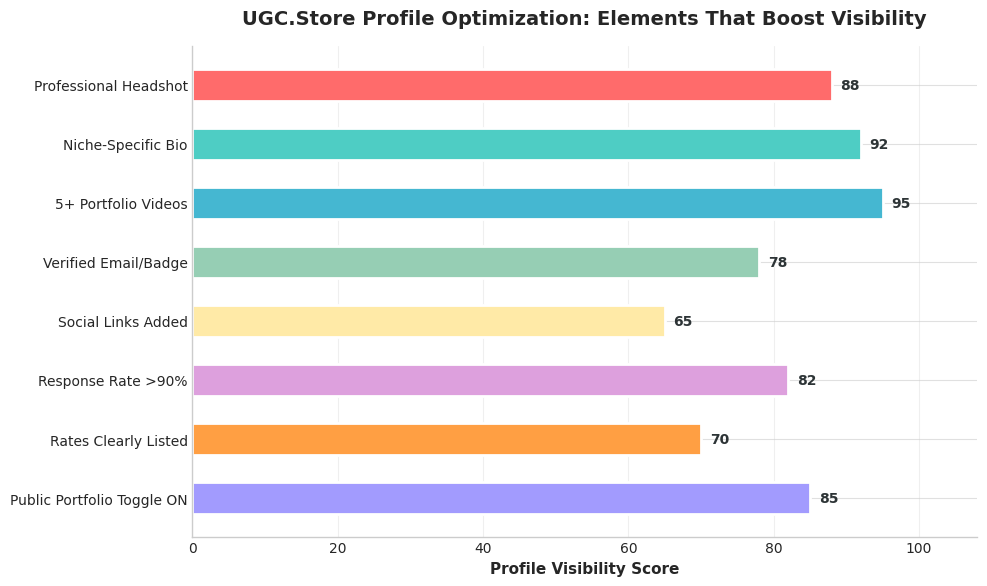
A basic UGC.Store profile — one headshot, generic bio, one video, no rates, private portfolio — averages 12–18 profile views per week. An optimized profile with all fields completed, five+ videos, niche keywords, and public visibility averages 120–260 views per week after the first month.
That is not a small difference. That is the difference between zero inquiries and consistent booking opportunities.
The algorithm behind UGC.Store search prioritizes complete profiles. When a brand searches for “tech UGC creator,” the platform surfaces creators who have:
- Tech-related keywords in their bio
- Tech videos in their portfolio
- Verified accounts
- Recent activity
- Public portfolios
Incomplete profiles get buried. Complete profiles get found.
Common UGC.Store Profile Mistakes to Avoid
Mistake 1: The invisible portfolio. Uploading videos but leaving the public toggle off. Brands cannot see private portfolios. This defeats the entire purpose of the platform.
Mistake 2: The generic bio. Writing something that could apply to any creator in any niche. Specificity sells. Genericity hides.
Mistake 3: No rates listed. Brands want to know if you fit their budget before reaching out. Mystery pricing creates friction. Friction kills deals.
Mistake 4: Outdated content. Leaving your first mock videos up for six months without adding new work. Your profile should evolve as your skills improve. Replace weak videos with stronger ones.
Mistake 5: Ignoring messages.UGC.Store tracks your response rate. A response rate below 70% hurts your search ranking. Reply to every inquiry within 24 hours, even if it is just to say you are not available.
Mistake 6: Wrong niche keywords. If you create beauty content but your bio mentions “lifestyle, travel, and fashion,” you will not show up in beauty searches. Match your keywords to your actual work.
How UGC.Store Ranks Creator Profiles

Understanding the platform’s ranking logic helps you optimize strategically. UGC.Store uses a combination of factors to determine which profiles appear first in brand searches:
Profile completeness (30% weight): Every filled field, every uploaded video, every verified detail increases your score.
Niche relevance (25% weight): How closely your bio, videos, and tags match the brand’s search terms.
Activity level (20% weight): How often you log in, update your portfolio, respond to messages, and apply to briefs.
Social proof (15% weight): Reviews from past brand clients, completed projects, and portfolio engagement.
Response rate (10% weight): Speed and consistency of your replies to brand inquiries.
This means you cannot just set up your profile and forget it. Active creators outrank passive ones. Update your portfolio monthly. Respond to messages within hours. Apply to relevant briefs as soon as they are posted.
Using Your UGC.Store Profile as a Sales Tool

Once your profile is optimized, it becomes more than a marketplace listing. It becomes a link you can share anywhere.
In cold pitches: Instead of attaching video files to emails, link directly to your UGC.Store portfolio. Brands can browse your work, see your rates, and contact you — all in one place.
On social media: Add your UGC.Store profile link to your TikTok and Instagram bios. When brands discover your content organically, they have a direct path to hire you.
In your email signature: A subtle but effective touch. Every email you send becomes a soft pitch.
On your personal website: Embed your UGC.Store portfolio or link to it as your primary booking channel.
Your profile is a living asset. The more places it lives, the more opportunities it generates.
Learn more about how UGC.Store connects creators with global brands on our About Us page.
The Weekly Profile Maintenance Routine
Optimization is not a one-time task. The most successful UGC creators on UGC.Store treat profile maintenance as a weekly habit.
Every Monday (5 minutes):
- Check for new brand messages and respond
- Review your portfolio and replace your weakest video with a new one
- Update your rates if you have gained new skills or completed high-value projects
Every month (15 minutes):
- Refresh your bio with any new achievements or niche pivots
- Review your analytics to see which videos get the most views
- Add new portfolio pieces that reflect your current best work
Every quarter (30 minutes):
- Audit your entire profile as if you were a brand seeing it for the first time
- Remove outdated content, update your headshot if needed, and refine your niche focus
This routine keeps your profile competitive and signals to the UGC.Store algorithm that you are an active, engaged creator worth surfacing to brands.
From Profile Setup to First Gig: What to Expect
Here is a realistic timeline after you optimize your UGC.Store profile:
Week 1: Profile goes live. You apply to 5–10 relevant briefs. Profile views start climbing.
Week 2: Brands begin viewing your portfolio. You might get 1–2 soft inquiries or profile views from brands in your niche.
Week 3: If you have applied consistently and your portfolio is strong, you receive your first serious inquiry or brief invitation.
Week 4: First gig booked, filmed, and delivered. You earn your first UGC paycheck and gain platform reviews.
Month 2–3: With reviews and completed projects on your profile, inbound inquiries increase. You spend less time pitching and more time creating.
The creators who succeed fastest are not necessarily the most talented. They are the most consistent. They optimize their profiles, apply to briefs weekly, respond to messages promptly, and treat UGC.Store like the professional marketplace it is.
Your UGC.Store Profile Is Open for Business
You now have the exact blueprint for creating a profile that brands cannot ignore. Every field has a purpose. Every video is a sales pitch. Every word in your bio is a keyword that brings the right client to your door.
The difference between a UGC creator who waits months for their first gig and one who lands work in weeks often comes down to one thing: profile optimization. Not talent. Not luck. Not expensive gear. Just the discipline to present yourself professionally in a space where brands are actively looking to hire.
Join UGC.Store today, set up your profile using this guide, and make yourself discoverable to the brands who need your UGC skills right now.
