
The Ultimate UGC Starter Kit: Gear, Apps, and Setup Under $100
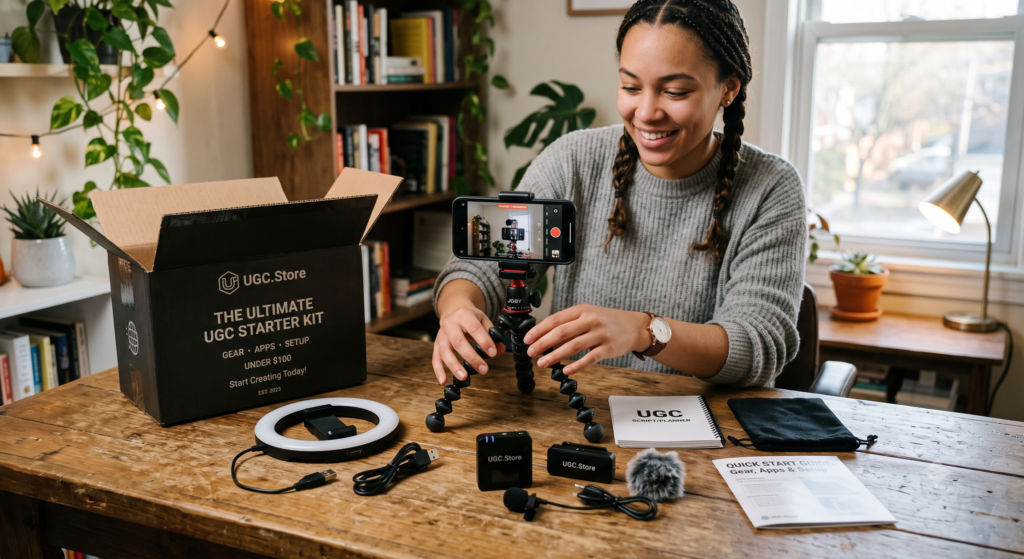
You have decided to become a UGC creator. You are excited about the income potential, the creative freedom, and the fact that you can build this business from your bedroom. But then you open YouTube and see creators recommending $2,000 cameras, $500 lighting kits, and professional editing suites that require a monthly subscription. Suddenly, your dream feels expensive.
Here is the truth that nobody tells beginners: you do not need any of that to start. The best UGC content in the world is filmed on smartphones. The most successful UGC creators started with gear that cost less than a nice dinner. And in 2026, a $100 setup is not just sufficient — it is actually preferred by brands who want authentic, relatable content.
This guide breaks down the exact gear, apps, and setup you need to start creating professional UGC videos today. No debt. No complexity. Just results.
“My entire first year of UGC work was filmed on an iPhone 11, a $20 Amazon tripod, and a window. I earned over $40,000 that year. The brands never asked what camera I used. They asked if I could deliver by Friday.”
— Chris L., UGC Creator (Fitness & Health), 3 years in the industry
The UGC Gear Philosophy: Authenticity Over Production Value
Before we talk about specific products, you need to understand why expensive gear can actually hurt your UGC career.
UGC stands for User-Generated Content. The entire value proposition is that it looks like real people sharing real opinions. When content is too polished, too cinematic, too professionally lit, it stops looking like UGC and starts looking like an ad. And audiences can smell an ad from a mile away.

Brands hire UGC creators because they want content that blends into social feeds. Content that feels native to TikTok, Instagram, and YouTube Shorts. Content that viewers trust because it looks like it came from a peer, not a production studio.
Your smartphone is not a limitation. It is your competitive advantage. It is the tool that makes your content feel authentic. Every dollar you spend on gear should serve one purpose: making it easier to create more content, faster. Not making your videos look like commercials.
The Complete $90 UGC Starter Kit
Here is everything you need, with exact price ranges and why each item matters.

1. Your Smartphone (FREE — You Already Own It)
Any smartphone from the last three years shoots 4K video at 30 or 60 frames per second. That is broadcast quality. The iPhone 12, Samsung Galaxy S21, Google Pixel 6, and newer models all have cameras that exceed the technical requirements of every major social platform.
What matters more than the phone model:
- Storage space. A 60-second 4K video takes about 400MB. Make sure you have 10–20GB free before a filming session.
- Battery health. A dying battery mid-shoot kills momentum. Film at 80% charge or higher.
- Clean lens. A smudged lens ruins sharpness faster than any camera limitation. Wipe it before every video.
Do not upgrade your phone for UGC. Upgrade your phone when you would upgrade it anyway. The creator earning $10,000 per month and the creator earning zero are often filming on the exact same device.
2. Phone Tripod ($20–$30)
A tripod is the single most important purchase you will make. Shaky handheld footage is distracting. A tripod lets you frame your shot, free your hands, and focus entirely on your performance.
What to look for:
- Adjustable height (minimum 12 inches, maximum 50+ inches)
- A phone holder with spring grip (fits all phone sizes)
- A Bluetooth remote shutter (lets you start recording without touching the phone)
- Lightweight but stable legs
The Amazon Basics tripod, UBeesize tripod, and Sensyne phone tripod are all popular options in the $20–$30 range. They are not built to last a decade, but they will absolutely get you through your first 100 UGC videos.
“I filmed my first 50 paid UGC videos on a $17 tripod from Target. It broke on video 51. I bought the exact same one again. Why fix what isn’t broken?”
— Maya S., UGC Creator (Beauty & Skincare), $5K/month
3. Ring Light or LED Panel ($25–$35)
Lighting is the difference between amateur and professional UGC content. Not camera quality. Lighting. A well-lit smartphone video looks better than a poorly lit DSLR video every single time.
You have two options at this price point:
Ring light ($25–$30): The classic circular light that clips to your tripod. It provides even, flattering light that reduces shadows on your face. Perfect for beauty, lifestyle, and testimonial UGC videos.
LED panel ($30–$35): A small rectangular light that offers more directional control. Better for product shots, unboxings, and tech UGC where you need to light an object rather than a face.
If you can only buy one, get the ring light. It is more versatile for beginner UGC creators who are primarily filming themselves.
Pro tip: Natural window light is free and often better than artificial light. Film within three feet of your largest window during daylight hours. Use your ring light only when natural light is unavailable.
4. Lapel Microphone ($15–$25)
Audio quality matters more than video quality. Viewers will watch a slightly grainy video with crystal-clear audio. They will not watch a sharp video with muffled, echoey sound.
Your phone’s built-in microphone is fine for starting out. But a lapel mic (also called a lavalier mic or clip-on mic) takes your UGC content to the next level for under $20.
What to look for:
- 3.5mm jack or USB-C connection (match your phone’s port)
- Omnidirectional pickup pattern (captures your voice from any angle)
- At least 6 feet of cable length
The PoP Voice lapel mic and Movo PM10 are reliable options around $15–$20. If your phone does not have a headphone jack, grab a USB-C lapel mic or a Lightning-compatible version for iPhone.
“I upgraded to a $18 lapel mic after my third client complained about echo in my bathroom filming setup. My booking rate doubled the next month. Brands notice audio quality even when they cannot articulate why.”
— Jordan P., UGC Creator (Home & Lifestyle), 2 years in the industry
5. Phone Mount / Holder ($10–$15)
Your tripod probably comes with a basic phone holder. But if you want more flexibility, a dedicated phone mount with a ball head lets you adjust angles quickly and switch between portrait and landscape without unscrewing anything.
This is optional in the first month but becomes valuable as you film more complex UGC setups — like overhead product shots, multi-angle tutorials, or lifestyle integration videos where the phone needs to sit at an unusual angle.
6. Editing Apps (FREE)
You do not need Adobe Premiere Pro. You do not need Final Cut. You do not need a $50/month subscription to create UGC content that converts.
CapCut (Free): The industry standard for UGC creators. Built-in captions, transitions, effects, and a timeline that is intuitive enough for beginners but powerful enough for professionals. Available on iOS, Android, and desktop.
InShot (Free with paid features): Great for quick edits, aspect ratio changes, and social-specific formatting. The free version handles 95% of UGC editing needs.
VN Video Editor (Free): A powerful alternative with keyframe animation and multi-layer editing. Perfect for UGC creators who want more control without paying.
All three apps export in 1080p or 4K. All three handle vertical video natively. All three are used by full-time UGC creators earning five figures per month.
Smartphone vs. Professional Camera: What Actually Matters
Let us settle this debate once and for all. Should you eventually buy a DSLR or mirrorless camera for UGC work?

The answer is: not until you are consistently earning $3,000+ per month from UGC and have a specific creative reason to upgrade. For 95% of UGC content, a smartphone is not just sufficient — it is superior.
Here is why:
Speed to publish. A smartphone video can be filmed, edited, and uploaded in under an hour. A DSLR workflow involves transferring files, color grading, and managing storage. Brands pay for speed.
Ease of use. You already know how to use your phone. Learning a professional camera’s settings — ISO, shutter speed, aperture, white balance — takes weeks. Those weeks are better spent filming more UGC videos.
Authentic vibe. DSLR footage looks cinematic. Cinematic looks like an ad. Ads get skipped. UGC gets watched because it feels native to the platform.
Portability. Your phone is always in your pocket. A DSLR setup requires a bag, lenses, and setup time. The best UGC ideas often strike spontaneously. Your phone captures them.
The only scenarios where a DSLR makes sense for UGC are: macro product shots requiring shallow depth of field, low-light situations where phone quality degrades, and specific brand requests for higher production value. Even then, many UGC creators rent cameras for specific projects rather than owning them.
The Free UGC Setup (Seriously, $0)
If $90 is still too much right now, you can start with literally zero dollars. Here is how:
- Phone: Already own it.
- Tripod: Stack books on a table. Lean your phone against a wall. Use a water bottle as a stand.
- Light: Film within 3 feet of your largest window between 10 AM and 3 PM.
- Audio: Speak clearly and close to the phone. Choose a small, carpeted room to reduce echo.
- Editing: CapCut is free.

Thousands of UGC creators have landed their first paid gigs using exactly this setup. The gear helps. But the gear does not get you hired. Your ability to create engaging, authentic UGC content gets you hired.
Upgrade your gear with your first few paychecks, not your credit card.
Setting Up Your UGC Filming Space
Your environment matters as much as your equipment. A clean, intentional filming space makes you look professional even with budget gear.
The 5-minute space setup:
- Choose your backdrop. A plain wall, a tidy bookshelf, or a curated corner of your room. Avoid clutter, mirrors, and windows behind you (they blow out your exposure).
- Position your light source. Window light or ring light should be in front of you, slightly above eye level, at a 45-degree angle.
- Set your phone at eye level. Never film looking down at your phone. It creates unflattering angles. Your phone lens should be level with your eyes or slightly above.
- Check your frame. Leave a small amount of headroom (space above your head). Position yourself slightly off-center using the rule of thirds.
- Test your audio. Record 10 seconds of talking, then listen with headphones. Is there echo? Background noise? Traffic? Adjust your location or add soft furnishings (pillows, blankets) to absorb sound.
This setup takes five minutes and costs nothing. It will make your UGC videos look more professional than 80% of what is currently on the market.
How Fast Does the $90 Kit Pay for Itself?
Let us talk about return on investment. Because that is what this really comes down to.

You spend $90 on gear. You film five mock videos and build your UGC.Store portfolio. You send ten pitches in week one. By week two, you land your first gig at $50. By week three, you land a second gig at $75. By week four, a third gig at $100.
Your $90 investment is fully recovered by the end of week three. Every gig after that is pure profit. Compare that to a film school education, a DSLR setup, or any other creative career path. UGC has the lowest barrier to entry and the fastest payback period of any content creation business.
The gear is not the investment. Your time is the investment. And 30 minutes of filming per day for two weeks will build a portfolio that earns back your setup cost many times over.
Why UGC.Store Does Not Require Expensive Gear
Some UGC platforms and marketplaces create an unintentional barrier to entry by featuring creators with cinematic portfolios and professional studios. This intimidates beginners and makes them feel like they need to spend money before they can earn money.
UGC.Store was built with a different philosophy. Our marketplace recognizes that UGC value comes from authenticity, not production value. Brands on our platform understand that smartphone-filmed content often outperforms studio content in paid UGC ads.

When you create your creator profile on UGC.Store, you are not competing against filmmakers with $10,000 setups. You are competing against other creators who understand what UGC actually is: real people creating real content for real brands.
Learn more about how we support creators at every level on our About Us page.
The Gear Upgrade Path: When and What to Buy Next
As you earn from UGC, you will naturally want to upgrade your setup. Here is the smart order to do it in:
First upgrade ($20–$30): Lapel mic if you started with phone audio. Audio improvement has the biggest impact on perceived quality.
Second upgrade ($30–$50): Better lighting. A second LED panel or a larger ring light for more even coverage. This matters if you are filming beauty tutorials or detailed product close-ups.
Third upgrade ($50–$100): A sturdier tripod with smoother pan capabilities. Useful if you are filming movement-heavy UGC like fitness or cooking content.
Fourth upgrade ($100+): Dedicated filming space upgrades. Backdrops, acoustic panels, or a dedicated desk setup. Only do this when you have consistent monthly income.
Never upgrade until: Your current gear is actively limiting the quality of your work. Not because you want gear. Because you need gear.
The Real UGC Starter Kit Is Not Gear
Here is the final truth. The most successful UGC creators are not separated from the strugglers by their equipment. They are separated by consistency, niche focus, and the willingness to put themselves on camera.
You can have a $5,000 setup and create zero UGC videos because you are afraid of how you look on camera. You can have a $0 setup and create five videos per week because you are committed to building your portfolio.
The gear in this guide removes friction. It makes filming easier, faster, and more enjoyable. But the engine of your UGC career is you. Your energy. Your authenticity. Your willingness to show up and create.
Buy the $90 kit. Set it up this afternoon. Film your first mock video before dinner. Join UGC.Store and upload your work. Your first paid UGC gig is closer than the nearest camera store.
