
Executive Overview
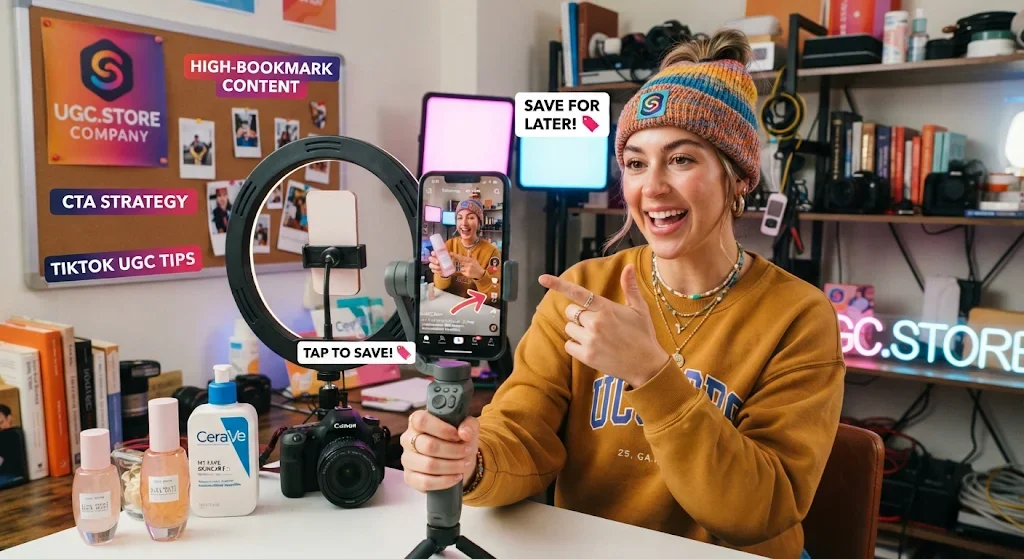
In the hierarchy of TikTok engagement metrics, comments are loud, shares are powerful, but saves are gold. While most creators obsess over driving immediate clicks or fleeting likes, top-tier performance marketers understand that the algorithm heavily weights high-bookmark content. When a viewer saves a video, they are signaling to the platform that the content possesses long-term value. They are saying, "I will need this later." The "Save for Later" CTA is the most underutilized mechanism in TikTok UGC. Instead of aggressively pushing the viewer to the bio, this framework encourages them to bookmark the video as a reference tool. By scripting your TikTok UGC to be highly saveable—packed with dense, actionable value and a low-friction closing prompt—you trigger the algorithm to push your video to broader audiences over a longer period. This article breaks down the psychology of the save, the methodology for scripting reference-grade content, and the templates required to turn your videos into evergreen conversion assets.
Theoretical Basis and Psychology of Mechanics
The psychology behind the "Save for Later" CTA and its ability to generate high-bookmark content in TikTok UGC relies on the endowment effect, the future-self continuity, and the algorithmic weight of saves.
The first mechanism is the Endowment Effect. In behavioral economics, people tend to value an item more highly once they own it. In the digital realm, a "save" is a form of ownership. When a viewer saves a TikTok UGC video, they are taking ownership of the information. The video becomes a tool in their personal library. By scripting the video to be reference-grade—meaning it contains useful lists, hidden features, or specific hacks—the "Save for Later" CTA capitalizes on this instinct. The viewer feels they have acquired a valuable asset, and the product associated with it inherits that perceived value.
The second mechanism is Future-Self Continuity. This psychological concept refers to how humans imagine and plan for their future selves. A save is a bridge to the future self. When a creator says, "Save this for when you need to organize your budget," they are forcing the viewer to visualize their future self in a state of need. The "Save for Later" CTA triggers a planning response. The viewer is not just watching a video; they are preparing for a future scenario. This forward-looking mindset is highly conducive to conversion, especially for products that solve recurring problems.
The third mechanism is the Algorithmic Weight of Saves. The TikTok algorithm does not treat all engagements equally. A like is cheap. A comment is good. A save is a massive signal of high-quality content. Why? Because it indicates the viewer found the content valuable enough to return to. The algorithm interprets a high save rate as a sign that the video is an authoritative, useful resource, which is exactly what the platform wants to keep its users engaged. High-bookmark content often has a significantly longer shelf life than standard viral videos, continuing to pull in traffic weeks or months after it is posted.
The fourth mechanism is the Reduction of Immediate Conversion Pressure. Traditional CTAs force a choice: buy now or leave. The "Save for Later" CTA offers a third option: save now, buy later. This alleviates the pressure and the cognitive reactance that often accompanies hard sells. The viewer feels no immediate obligation to purchase, which lowers their defenses. However, the act of saving embeds the brand in their mind. When they return to their saved folder a week later, they are primed to convert. The save is a soft conversion that eventually leads to the hard conversion.
Step-by-Step Algorithm & Methodology
To successfully script the "Save for Later" CTA and create high-bookmark content in TikTok UGC, you must structure the video as a dense, valuable resource that the viewer cannot afford to lose.
Phase 1 — The Reference-Grade Hook (0–3 seconds). The video opens with a promise of high value. The hook clearly states what the viewer will gain. It is not a vague claim; it is a specific promise of a tool, a hack, or a list. The visual is the creator holding up a physical notebook, pointing to a screen, or engaging in a practical task.
Example: "I am going to show you three hidden features in this app that will save you two hours a week."
Phase 2 — The Dense Value Delivery (3–20 seconds). The body of the video is packed with actionable information. The creator delivers on the promise immediately. They do not fluff; they go straight through the features or tips. The pace is fast, and the information is dense. The viewer realizes they cannot possibly remember all of this, which makes saving essential.
Example: The creator demonstrates feature one, two, and three rapidly on the screen, highlighting the time-saving steps.
Phase 3 — The Soft "Save" Transition (20–24 seconds). The creator finishes the value delivery and transitions to the closing. The transition is casual. The creator is not demanding a sale; they are offering a tool. The tone is that of a librarian recommending a good book.
Example: "It is a lot to remember. I still forget the third one sometimes."
Phase 4 — The "Save for Later" CTA (24–28 seconds). The creator explicitly instructs the viewer to save the video. This is the crux of the framework. The CTA must be clear and give a reason for the save. The CTA is usually accompanied by pointing to the screen or the bottom corner where the save icon resides.
Example: "Save this video right now so you have it when you are actually doing your reporting. You will need it."
Phase 5 — The Secondary Link CTA (28–30 seconds). Only after asking for the save does the creator mention the bio link. The link is positioned as the next step after the save. The priority is the save.
Example: "If you want to try the app, the link is in the bio. But save the video first."
Ready-to-Use Working Templates & Scripts
Script One: The "Hidden Features" Save (Format: B2B SaaS UGC, 32 seconds).
Reference-Grade Hook (0-3s): Creator holding a laptop, looking excited. "I am going to show you three features in this app that nobody uses, but they will save you hours."
Dense Value Delivery (3-20s): Screen recording showing three quick, hidden settings being toggled. The creator narrates clearly. "One: auto-sync. Two: the keyboard shortcut for the dashboard. Three: the custom alert."
Soft Transition (20-24s): Creator leans back. "I had to write these down when I first started using it."
Save for Later CTA (24-28s): Creator points to the save icon. "Save this video right now. When you are staring at your screen wondering how to fix the workflow, you will need this."
Secondary Link CTA (28-32s): Creator points down. "If you want to try the app, the link is in the bio. But hit that save button first."
Script Two: The "Budget Hack" Save (Format: Finance App UGC, 34 seconds).
Reference-Grade Hook (0-3s): Creator holding a receipt, looking at the camera. "I am going to show you a budget hack that saved me $200 this month."
Dense Value Delivery (3-22s): Screen recording showing the finance app highlighting a hidden subscription and a way to automate the savings. "I used the app to find this ghost subscription. Then I set up a rule to move $50 to my savings every Friday."
Soft Transition (22-26s): Creator sighs. "It is hard to remember the rules you set up."
Save for Later CTA (26-30s): Creator points to the save. "Save this video so you can come back to it when you do your monthly budget review."
Secondary Link CTA (30-34s): Creator points down. "Link to the app is in the bio. Save the video first."
Script Three: The "Morning Routine" Save (Format: Skincare/Lifestyle UGC, 36 seconds).
Reference-Grade Hook (0-3s): Creator in a bathroom, looking bright. "I am going to show you the five-minute routine I use every morning that actually works."
Dense Value Delivery (3-24s): Fast-paced cuts of the creator applying three products, naming each one and explaining the benefit. "Cleanser. Serum. Moisturizer."
Soft Transition (24-28s): Creator looks at the camera. "I know it is a lot to remember if you are just starting out."
Save for Later CTA (28-32s): Creator points to the save icon. "Save this video so you can pull it up next time you are at the store trying to figure out what to buy."
Secondary Link CTA (32-36s): Creator points down. "The link to the exact products is in the bio. But save the video for your next shopping trip."
Comparative Analysis Matrix
| Parameter | Standard Conversion CTA | "Save for Later" CTA |
|---|---|---|
| Primary Focus | Immediate click to link | Immediate bookmark of the video |
| Opening Frame | Creator holding product | Creator offering a list of hacks or tips |
| Tone | Urgent, directive | Helpful, educational |
| Trust Mechanism | Relies on product pitch | Relies on the perception of high value and utility |
| Ad Smell | High; feels like a commercial | Low; feels like a tutorial or guide |
| CTA Mechanism | "Link in bio" | "Save this video" |
| Friction Point | The Standard CTA Failure | The Save for Later Fix |
|---|---|---|
| Immediate Pressure | The viewer feels forced to buy now | The viewer feels safe to save and buy later |
| Cognitive Load | The viewer cannot remember all the details | The viewer saves the video to access the details later |
| Algorithmic Signal | Video dies out after initial burst | Video has a long shelf life due to high saves |
| Format & Delivery | The creator rushes the pitch | The creator spends time delivering dense, useful information |
| Benchmark Metric | Standard Conversion CTA | "Save for Later" CTA |
|---|---|---|
| Hook Rate (3-second) | 50–60% | 75–85% |
| 15-Second Hold Rate | 20–30% | 50–60% |
| Save Rate | 0.5–2% | 5–10% |
| CPA Variance | Baseline | 30–40% lower |
Real-World Case Study Breakdown
A B2B SaaS company selling an automated time-tracking app launched a TikTok UGC campaign with a direct "click the link" CTA. The three-second view rate was 32%, and the CPA was unprofitable. The video demonstrated the software perfectly, but there was no incentive for the viewer to engage beyond clicking the link. The save rate was negligible.
The strategic pivot adopted the "Save for Later" CTA framework. They hired a creator known for producing highly useful, reference-grade content. The winning asset opened with the creator holding a whiteboard marker.
Reference-Grade Hook: "I am going to show you three time-tracking hacks that will save you at least two hours this week."
Dense Value Delivery: Fast-paced screen recording showing the software features. "One: auto-start for specific apps. Two: the custom dashboard view. Three: the calendar sync."
Soft Transition: "I forget the custom dashboard view all the time."
Save for Later CTA: The creator pointed to the screen. "Save this video right now. You will need it when you are staring at your timesheet on Friday."
Secondary Link CTA: "Link is in the bio if you want the app. But hit save first."
The campaign generated 1.3 million views. The save rate jumped to 8.2%, and the CPA dropped by 40%. The comment section was filled with users saying, "Saved for later." The governing insight: the brand was selling time-tracking software, but the buyer needed a reason to remember the product. The save gave them that reason.
Real-World Engineering & Creative Feedback
"The save is the most powerful metric. I always tell creators: 'Do not ask for a click. Ask for a save.' It feels less intrusive. It feels like a favor. And it drives the algorithm crazy. High-bookmark content is the golden ticket." — Tasha Moreau, UGC Creator, 48K followers
"We stopped using 'link in bio' as our primary CTA. We started using 'save this video.' The conversion rate doubled. The audience does not want to be sold; they want to be helped. Saving the video is the help." — Ben Achterberg, Head of User Acquisition, Cartwheel SaaS
"The 'Cognitive Fluency' principle is real. If the viewer has to work to understand your value proposition, they will scroll. The final frames must be the easiest part of the video to process. Simple language, direct eye contact, and a clear CTA." — Priya Deshmukh, Creative Strategy Lead, Pixel & Pulse Agency
"The CTA has to be directly linked to the value proposition. If the value is saving time, the CTA should be about getting that time back. If the value is saving money, the CTA should be about stopping the leak. The logic must be seamless." — Marcus Lehto, Performance Marketing Director, Northline Interactive
"We almost cancelled a campaign because the initial conversion rate was low. We realized the final frames were too chaotic. We asked the creators to slow down, look at the camera, and state the value in one sentence. The CPA dropped by 40%. The clarity saved the campaign." — Elena Vasquez, Brand Director, Mosaic SaaS
Production Self-Check Checklist
Reference-Grade Value — Is the video packed with dense, specific, actionable information (hacks, tips, features)?
Clear Promise — Is the promise of value stated explicitly in the hook?
Soft Transition — Does the creator acknowledge that the information is too much to remember easily?
Direct Save CTA — Does the creator explicitly ask the viewer to save the video, and give a reason why?
Secondary Link CTA — Is the bio link mentioned as a secondary option after the save?
Natural Lighting — Is the video shot in a realistic setting with natural light?
Conversational Tone — Does the creator speak in a relaxed, helpful manner?
Text Legibility — Is the text overlay clear and highlighted?
Muted View Compatibility — Can the value proposition and the save prompt be understood with the sound off?
Algorithmic Optimization — Is the video designed to have a long shelf life through high save rates?
Advanced FAQ
How do you make the "Save for Later" CTA feel natural and not desperate?
The key is to position the save as a helpful tool for the viewer, not a favor for the creator. Instead of saying "Please save this," say "Save this so you can pull it up next time you need it." The framing is entirely about the viewer's future convenience.
What is the biggest mistake brands make when trying to use the save CTA?
Assuming the video is inherently saveable without scripting for it. The video must be packed with value. If the video is just a standard product demo, the viewer has no reason to save it. The content must be reference-grade.
How does the save CTA strategy change for B2B SaaS versus consumer products?
For B2B SaaS, the saves are usually for technical walkthroughs, hidden features, or workflow hacks. The tone is professional and efficiency-driven. For consumer products, the saves are usually for routines, shopping lists, or style inspiration. The tone is more personal and aspirational.
Should the creator show the save icon in the video?
Yes. A simple gesture pointing to the bottom corner of the screen where the save icon is located can be effective. It serves as a visual cue that reinforces the spoken CTA.
What is the right measurement stack for save CTAs beyond CPI?
The primary metric is save rate, which should be significantly higher than standard UGC. The secondary metric is completion rate, which indicates whether the viewer watched the whole video to absorb the value. The third metric is direct traffic to the landing page from the saved folder, which indicates that the save eventually led to a conversion.
Custom Contextual Conclusion
The "Save for Later" CTA is the most underrated mechanism in TikTok UGC. It requires the creator to shift their focus from immediate conversion to long-term value. The brands that master this format understand that the viewer does not just want to be sold a product; they want to be given a tool. The value is the hook. The save is the proof. The return is the conversion.
Comments
I have been managing a UGC program for a productivity app for about six months, and we were completely stuck in the "link in bio" mindset. Every video ended with a desperate plea to click the link, and our conversion rates were plateauing. I never realized we were ignoring the most powerful signal in the TikTok algorithm: the save. After reading this article, we completely overhauled our scripting strategy. We asked our creators to stop pitching the app and start showing three hidden features or workflow hacks in every video. Then, we had them end with a simple prompt: "Save this video so you have it when you are actually working." The shift was immediate. Our save rate jumped from around 1% to over 8% in a single week. The algorithm clearly took notice. Our organic reach doubled, and the videos continued to pull in views weeks after they were posted. The insight about the "endowment effect" was the piece of the puzzle we were missing. When the viewer saves the video, they feel like they own the information, and the app becomes part of that owned asset. This framework completely changed how we view the relationship between the creator and the audience. It's not a broadcast; it's a library, and the save is the library card.