
The UGC Creator’s Tech Toolkit: What You Really Need to Start (2026 Edition)
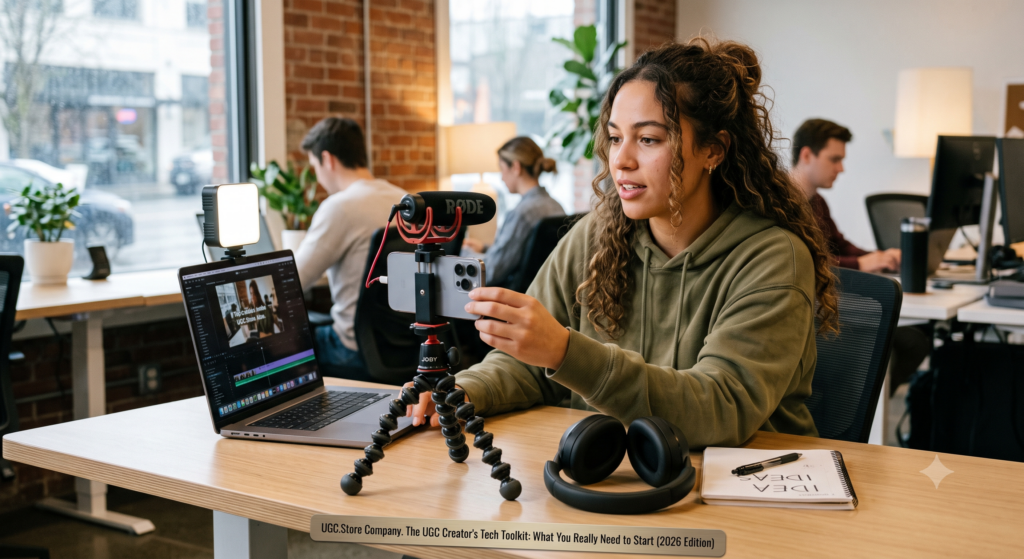
When you’re starting as a UGC creator, it’s easy to fall into the trap of thinking you need expensive gear. A $2,000 camera, professional lighting, and a studio setup. But the truth is: most brands don’t want that. They want authentic content that looks like it was shot by a real person – because it was.
In 2026, the most successful UGC creators aren’t using Hollywood gear. They’re using smartphones, natural light, and a few affordable tools that make a huge difference. This guide breaks down exactly what you need to start, what you can add later, and what you should never waste money on.
The Core Philosophy: “Good Enough” Is Better Than “Perfect”
Brands hire UGC creators for authenticity, not cinematic perfection. A slightly shaky shot with good audio and natural lighting will outperform a sterile studio video every time.
| What Brands Actually Care About | What They Don’t Care About |
|---|---|
| Clear audio | 4K resolution |
| Good lighting (even natural) | Expensive cameras |
| Stable framing (no motion sickness) | Professional studio backgrounds |
| Authentic delivery | Fancy transitions |
| Following the brief | Complex editing effects |
Your goal isn’t to look like a movie studio. Your goal is to look like a real person who happens to make great content.
The Starter Kit (Under $150)
This is everything you need to book your first paid gig. No more, no less.
1. A Smartphone (You Already Have One)
Any smartphone from the last 3‑4 years is powerful enough for UGC. iPhone 11 or newer, Samsung Galaxy S20 or newer, Google Pixel 5 or newer – all work perfectly.
What matters:
- Good video resolution (1080p minimum, 4K is nice but not required)
- Decent low‑light performance (shoot near windows during the day)
- Image stabilization (helps reduce shaky footage)
Pro tip: Clean your lens before every shoot. Wipe it on your shirt. You’d be surprised how many creators forget this.
2. A Simple Tripod ($20–$40)
You need stable shots. A cheap tripod with a smartphone mount is fine.
What to look for:
- Extendable legs (for different heights)
- Flexible legs (for wrapping around railings, chairs, etc.)
- Bluetooth remote (optional but handy)
Recommended: Joby GripTight or a generic flexible tripod from Amazon ($20–30).
3. Natural Light (Free)
The best light source is free – it’s called the sun.
How to use it:
- Film near a window during daytime
- Face the window (light on your face, not behind you)
- Use sheer curtains to diffuse harsh sunlight
- Avoid mixed lighting (turn off overhead lamps)
Pro tip: Golden hour (the hour after sunrise and before sunset) gives you soft, warm light that looks amazing.
4. A Lavalier Microphone ($15–$30)
Audio is more important than video. Bad audio will get your content rejected. A cheap clip‑on mic is a game‑changer.
Recommended: Boya BY‑M1 ($20) or similar. Plugs into your phone’s headphone jack or USB‑C. Records clean audio from close to your mouth.
Pro tip: If you don’t have a mic, film in a quiet room and speak clearly. Your phone’s built‑in mic is okay in a silent environment.
5. Free Editing Apps
You don’t need Adobe Premiere. These free apps are powerful enough for 99% of UGC.
| App | Best For | Platform |
|---|---|---|
| CapCut | Everything – cuts, transitions, captions, effects | iOS, Android, Desktop |
| InShot | Simple editing, speed ramping, music | iOS, Android |
| Canva | Adding text overlays, branding, thumbnails | Web, iOS, Android |
CapCut is the industry standard for UGC creators. It’s free, easy to learn, and has all the features you need.
The Next Level ($150–$500)
Once you’ve landed a few paid gigs, you can reinvest in gear that makes your workflow faster and your quality more consistent.
1. Ring Light ($50–$100)
Natural light is free but inconsistent. A ring light gives you consistent, flattering light anytime.
What to look for:
- Adjustable brightness (dimmable)
- Adjustable color temperature (warm to cool)
- Smartphone mount in the center
- 10‑12 inches diameter is plenty for UGC
Recommended: Neewer or UBeesize ring lights ($50–80).
When to use it: Evening shoots, cloudy days, or when you want a specific “beauty” look.
2. Portable LED Panel ($60–$120)
More versatile than a ring light. You can angle it to create side lighting or background accents.
Recommended: Lume Cube Panel Mini or similar.
Pro tip: Use two lights – one key light (main) and one fill light (softer) – for professional results.
3. Smartphone Gimbal ($100–$150)
If you shoot a lot of moving shots (walking, panning, following action), a gimbal stabilizes your footage.
Recommended: DJI Osmo Mobile SE ($90) or similar.
When you need it: Fitness content, product demonstrations that involve movement, or walking videos.
4. External Hard Drive ($50–$100)
UGC files add up fast. A 1TB external drive keeps your raw footage organized and your phone storage free.
Recommended: SanDisk, WD, or Samsung portable SSD.
5. AI Tools Subscription ($10–$20/month)
AI can save you hours of editing time.
| Tool | What It Does | Cost |
|---|---|---|
| CapCut Pro | Advanced AI editing, captions, effects | $10/month |
| Opus Clip | Turns long videos into short clips automatically | $19/month |
| Descript | Text‑based video editing | $15/month |
Start with free tools. Upgrade when you have regular paid work.
The Pro Setup ($500+)
This is for full‑time creators who want to work faster and charge premium rates.
1. DSLR or Mirrorless Camera ($500–$1,500)
If you want to offer “high‑end” UGC (for luxury brands, premium products), a dedicated camera gives you better depth of field and low‑light performance.
Recommended entry‑level: Sony ZV‑E10, Canon EOS M50, or iPhone 15/16 Pro (honestly, the latest iPhones are competitive).
Note: Most brands still prefer smartphone‑shot UGC because it looks more authentic. Don’t rush to buy a camera.
2. Professional Microphone ($100–$300)
Lavalier mics are fine, but a shotgun mic on a small recorder gives you broadcast‑quality audio.
Recommended: RØDE VideoMic GO II or DJI Mic.
3. Editing Software ($20–$50/month)
If you outgrow CapCut, consider:
| Tool | Best For | Cost |
|---|---|---|
| Adobe Premiere Rush | Easy pro editing | $10/month |
| DaVinci Resolve | Professional color grading | Free (Studio version $295) |
| Final Cut Pro | Mac users | $300 one‑time |
4. Backdrop and Props ($50–$200)
A clean, neutral background (white wall, wood panel, fabric backdrop) makes your videos look more professional. Simple props (shelves, plants, decorative items) add visual interest.
Pro tip: Your own home, styled neatly, is the best backdrop.
What You Absolutely Do Not Need
| Item | Why You Don’t Need It |
|---|---|
| Expensive camera | Smartphones are good enough; brands prefer authentic phone footage |
| Studio lighting kit | Natural light + a $50 ring light is plenty |
| Green screen | You’re not making Hollywood movies |
| Multiple lenses | You’re not shooting a documentary |
| Expensive editing software | CapCut is free and powerful |
| Soundproofing | A quiet room and a cheap mic are fine |
Software and Apps You Actually Need
Beyond editing, these tools will help you run your UGC business.
| Category | Tool | Cost |
|---|---|---|
| Portfolio | ugc.store/, Canva, or Linktree | Free – $10/month |
| Invoicing | Wave, PayPal, or HoneyBook | Free – $15/month |
| Contracts | ugc.store/ built‑in, Bonsai, or HelloSign | Free – $20/month |
| File transfer | Google Drive, Dropbox, WeTransfer | Free |
| Calendar | Google Calendar | Free |
| Task management | Trello, Notion, or Asana | Free – $10/month |
Start with free versions of everything. Only pay for tools when you’re earning consistently.
Sample Tech Stack by Experience Level
Beginner (First 0‑5 paid gigs)
- Camera: Smartphone
- Audio: Phone mic (quiet room) or $20 lavalier
- Lighting: Natural light
- Stabilization: None (rest phone on books) or $20 tripod
- Editing: CapCut (free)
- Portfolio: ugc.store/ profile
- Invoicing: PayPal
Total cost: $0–$50
Intermediate (5‑20 paid gigs)
- Camera: Smartphone
- Audio: Lavalier mic ($20‑30)
- Lighting: Ring light ($50‑80)
- Stabilization: Tripod + maybe gimbal ($90‑150)
- Editing: CapCut Pro ($10/month)
- Portfolio: ugc.store/ + Linktree
- Invoicing: Wave (free)
Total cost: $150–$300
Pro (20+ paid gigs, full‑time)
- Camera: Latest smartphone or entry‑level mirrorless
- Audio: Wireless lavalier or shotgun mic ($100‑200)
- Lighting: LED panel kit ($150‑300)
- Stabilization: Gimbal + sturdy tripod
- Editing: CapCut Pro + Descript or Premiere Rush ($20‑30/month)
- Portfolio: ugc.store/ + personal website
- Invoicing: HoneyBook or Bonsai ($15‑30/month)
Total cost: $500–$1,000+
How to Make Your Phone Look Like a Pro Setup
Even with just your phone, you can produce professional‑looking content.
- Clean your lens – Every time.
- Shoot in 4K at 30fps or 60fps – Gives you flexibility in editing.
- Lock exposure and focus – Tap and hold on your subject, then slide the exposure up/down.
- Use the back camera – It’s higher quality than the front camera (use a mirror or another phone as a monitor).
- Shoot horizontal or vertical – Depends on the brief. Ask if unsure.
- Keep your phone charged – Nothing worse than dying mid‑shoot.
The “Good Enough” Test
Before you buy any gear, ask yourself: “Will this help me book more clients?”
- A $20 mic? Yes – audio quality matters.
- A $50 ring light? Yes – consistent lighting makes you look more professional.
- A $1,000 camera? Probably not – your phone is already good enough.
Most top UGC creators use smartphones. Don’t let gear envy stop you from starting.
Your Action Plan
Week 1: Audit What You Already Have
- Check your phone’s video quality (1080p minimum)
- Find a quiet room with good natural light
- Download CapCut (free) and watch a 10‑minute tutorial
Week 2: Buy the Essentials (Under $50)
- $20 tripod
- $20 lavalier microphone
Week 3: Practice
- Film 3 test videos using only your phone, tripod, and natural light
- Edit them in CapCut
- Upload them to your portfolio
Month 2+: Upgrade as You Earn
- After 3‑5 paid gigs → buy a ring light ($50‑80)
- After 10‑15 paid gigs → consider a gimbal or LED panel
- Only buy a camera if clients specifically request higher production value
The Bottom Line
You don’t need expensive gear to start earning as a UGC creator. A smartphone, a $20 tripod, a $20 microphone, and free editing software are enough to land your first paid gig. Focus on authenticity, clear audio, good lighting, and following the brief. That’s what brands actually pay for.
As you earn, reinvest in tools that save you time and make your content more consistent. But never forget: your skill and your authenticity are worth more than any camera.
Ready to Start Creating?
You have the gear (or you know exactly what to buy). Now you need brands to work with.
👉 Create your free profile on ugc.store/ and start applying to real briefs today. Your first paid gig is waiting.
ugc.store/: Connect. Create. Convert. Start with What You Have.
